Check a USB-C Charger Before You Plug It In
Matthew Leo · Published August 13, 2026 · Guides
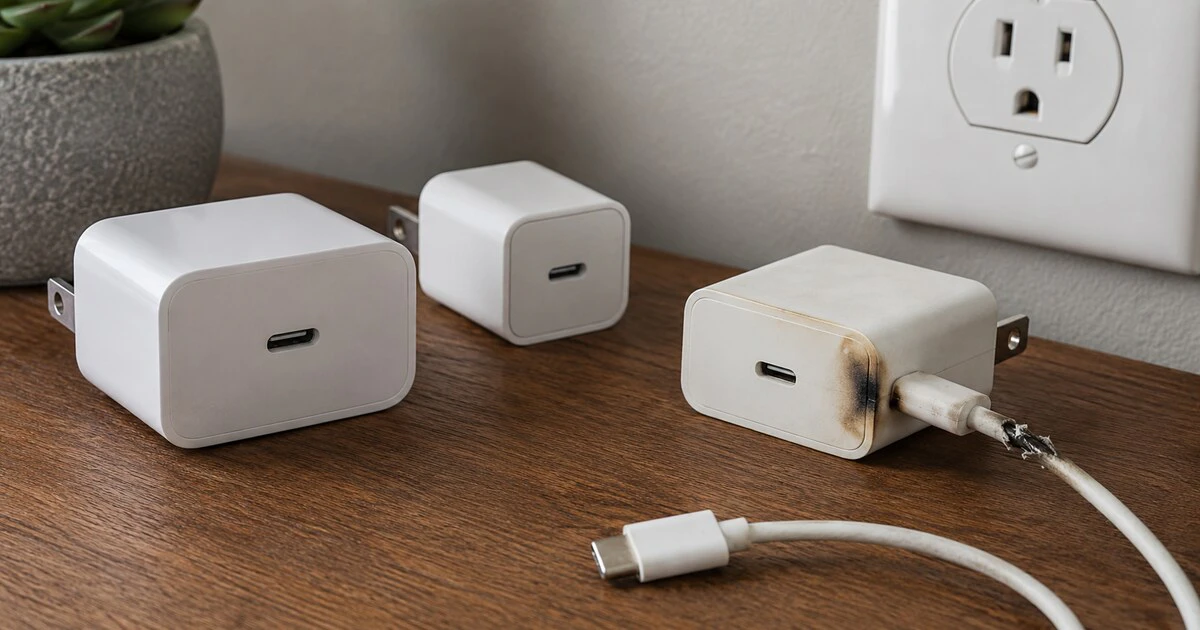
A USB-C connector tells you the plug will fit. It does not prove that the wall charger is electrically safe, properly certified or capable of delivering the power your laptop expects.
Before using an unfamiliar charger in Canada, inspect the unit itself for a recognized Canadian certification mark, match its output to the device and reject any cable or casing with heat damage. A cheap replacement is not a bargain if its isolation between household voltage and the USB output is inadequate.
This guide covers wall chargers for phones, tablets, handheld consoles and USB-C laptops. It does not cover electric-vehicle charging or repairs inside a power adapter; wall chargers contain hazardous voltages and should not be opened.
Find the certification mark on the charger
Health Canada says electrical products that plug into an outlet should carry a recognized Canadian certification mark such as CSA, cUL or cETL. Its online electrical-product guidance warns consumers not to buy plug-in products without one.
The mark belongs on the product, not merely in a listing photograph or on the box. Look closely at the label moulded or printed onto the adapter. The mark should include the Canadian indicator required by the certifying body; a plain US-only mark is not automatically the same thing.
A certification symbol can be copied, so also consider the seller, model number and quality of the label. If the brand, electrical ratings or model cannot be traced to a manufacturer, return the charger. A marketplace product with a convincing logo but no accountable supplier is difficult to verify and harder to remedy after a failure.
Read the output rather than guessing from size
The label lists input and output values. Canadian wall power is normally within the 100–240 V input range printed on modern travel chargers, but the output determines what the connected device can receive.
USB Power Delivery chargers advertise several voltage and current combinations, such as 5 V, 9 V, 15 V or 20 V. The charger and device negotiate a supported level; a properly designed high-wattage charger does not force maximum power into a small phone.
A charger with too little power is usually a performance problem rather than a reason for the device to accept unsafe voltage. A laptop may charge slowly, display a warning or lose battery while working. Use the computer manufacturer’s recommended wattage as the starting point.
| Check | Why it matters |
|---|---|
| Canadian certification mark | Shows assessment to an applicable Canadian safety standard |
| Input range | Confirms compatibility with local mains power |
| Output profiles | Shows supported USB power levels |
| Total and per-port wattage | Multi-port chargers may divide power |
| Model and manufacturer | Allows recall and support searches |
For a multi-port charger, the large number on the front may be the total shared output. Connecting a second device can reduce power to the first port or interrupt charging briefly while the adapter renegotiates.
Inspect the cable as carefully as the brick
A sound wall adapter cannot make a damaged cable safe. Stop using cables with exposed conductors, cracked plugs, melted plastic, loose connector shells or discolouration near either end.
High-power USB-C charging also depends on the cable’s capabilities. Some cables are intended for basic phone charging, while higher-power laptop use may require an electronically marked cable rated for the negotiated current. When in doubt, use the cable supplied by the device maker or a reputable cable whose rating is clearly stated.
Do not rely on a cable’s thickness or braided covering. Those features can improve durability, but they do not confirm its electrical design.
Run a controlled first-use check
- Place the charger on a hard, uncovered surface with ventilation.
- Plug it directly into a sound wall outlet.
- Connect one device with a known-good cable.
- Confirm that the device reports normal charging without repeated disconnects.
- After 10 to 15 minutes, check for unusual odour, sound, discolouration or excessive heat.
- Disconnect immediately if the plug is loose, sparking occurs or charging repeatedly cycles.
Chargers can become warm under load. Heat becomes a warning when the unit is painful to touch, smells hot, changes colour, deforms or makes a persistent crackling or buzzing sound. Do not cover a charger with bedding or clothing, and do not leave a questionable unit charging unattended.
Keep liquids away from outlets and connectors. If a charger becomes wet, unplug power only when it is safe to do so and replace the unit rather than attempting to dry and reuse it.
Check Canadian recalls by model
Search the federal Recalls and Safety Alerts database using the brand and model number. A generic product can appear under a marketplace seller’s name, so compare photographs and electrical labels as well.
Health Canada has repeatedly identified uncertified chargers with shock and fire hazards. In one 2025 notice, the department said a ten-port charging station sold through Amazon.ca posed an unreasonable electrical-shock risk and advised consumers to stop using it.
The department’s broader USB charger safety assessment describes risks from inadequate separation between mains and low-voltage circuits, overheating, burns and fire. Not every charging incident was caused by the charger, but the failure modes are serious enough to justify a two-minute inspection.
Stop using it when evidence changes
Unplug a charger after a drop, power surge or overheating event and inspect it again. Replace it if the prongs are bent, the enclosure has opened or a port has loosened. Tape does not restore a damaged mains enclosure.
If a charger smokes, burns, shocks someone or damages property, seek emergency or medical help as appropriate. Preserve photographs, the model label and purchase record, then report the incident through Health Canada’s consumer-product process.
Dispose of recalled or damaged chargers through local electronic-waste rules; do not donate or resell them. A safe USB-C setup is a chain: certified wall adapter, suitable cable, undamaged outlet and compatible device. The familiar connector is only the visible link.
Tags: USB-C, chargers, consumer safety, laptops, Canada