Choose a USB-C Charger That Is Safe and Fast
Matthew Leo · Published August 2, 2026 · Guides
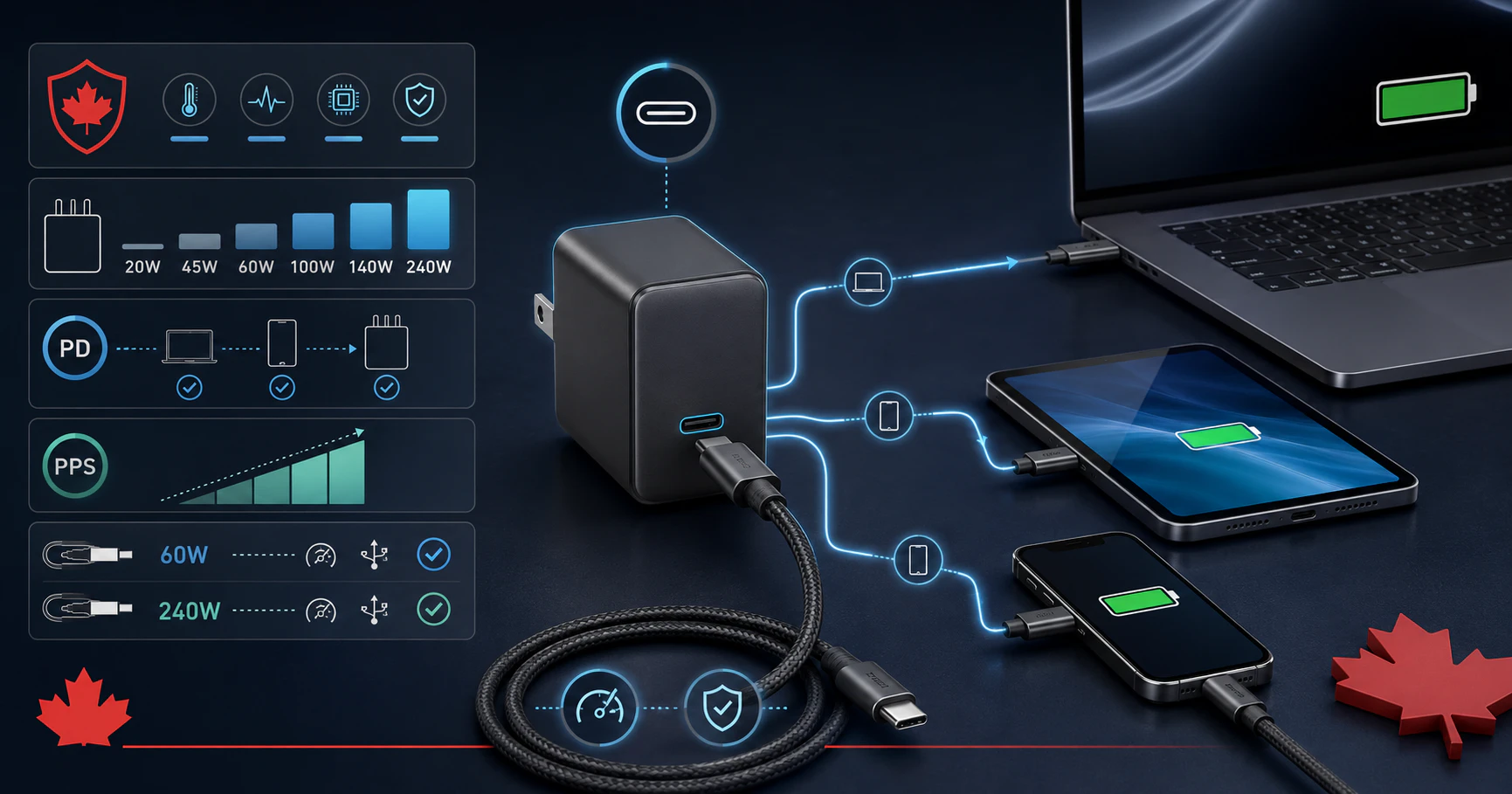
USB-C made charging cables look more consistent while leaving their actual capabilities impressively confusing.
Two chargers can use the same connector yet differ in power, charging protocol, safety certification and ability to charge a laptop under load. The cable adds another variable because some USB-C cables carry far more power or data than others.
The safest buying strategy is to start with the device’s requirements, then match the adapter and cable to them. Do not begin with the largest wattage printed on an online listing.
The plug shape does not determine the power
USB-C describes the reversible connector. It does not promise a particular charging speed, data rate or video capability.
USB Power Delivery, usually shortened to USB-PD, is the system that allows compatible devices and chargers to negotiate voltage and current. The device requests a supported power level instead of simply receiving the charger’s complete advertised output.
That means a properly designed 100W USB-PD charger can normally charge a phone that requires much less power. The phone does not absorb 100 watts merely because the adapter can provide it.
Higher capacity is useful when one charger must serve several devices. It does not make every phone charge faster, because the device controls its maximum supported rate.
Find the device’s recommended wattage
Check the manufacturer’s support page, original adapter or technical specifications. Use the recommended wattage as the target for normal charging and the manufacturer’s stated fast-charging requirement when speed matters.
| Device type | Reasonable starting range | What to verify |
|---|---|---|
| Phone | 20W–45W | USB-PD and any PPS requirement |
| Tablet | 20W–65W | Manufacturer’s fast-charge support |
| Thin laptop | 45W–100W | Minimum power while the laptop is operating |
| Large performance laptop | 100W–240W or proprietary adapter | Whether full performance is supported through USB-C |
These ranges are purchasing guides, not universal specifications. A gaming or workstation laptop may use USB-C only for slower charging while still requiring its proprietary adapter for full performance.
Apple recommends using a USB-C adapter with equal or greater wattage than the adapter supplied with a Mac. A lower-powered adapter may charge slowly, lose ground while the computer is busy or trigger a Slow Charger warning.
Look for USB-PD and PPS when required
For current iPhones, Apple says fast charging requires an 18W-or-greater USB-C adapter or a comparable third-party adapter supporting USB Power Delivery.
Google’s newer Pixel guidance adds another term: Programmable Power Supply, or PPS. PPS allows compatible devices and adapters to adjust voltage in smaller steps, which can improve charging efficiency and thermal control.
Google recommends its supported chargers or a compatible PPS adapter for current Pixel fast-charging rates. An adapter that charges an iPhone quickly may still charge a Pixel below its advertised maximum if the necessary PPS profile is missing.
Look for the complete supported standards and output profiles in the specifications. “Fast charger” is marketing language until the listing explains what fast means.
Multi-port chargers divide their power
A 100W charger with three ports does not necessarily provide 100W to every connected device. The total capacity is normally shared, and connecting another cable can change how much each port receives.
The manufacturer should publish a distribution table showing the output available with one, two or several ports occupied. Read it before buying a compact charger for a laptop and phone.
Apple’s 35W dual-port adapter, for example, can split power between connected devices. Apple documents different allocations depending on what is attached, including an even 17.5W split in several common combinations.
If a laptop repeatedly starts and stops charging when another device is connected, the adapter may be reallocating power rather than failing.
The cable needs its own rating
A capable adapter cannot deliver full power through an unsuitable cable.
The USB Implementers Forum now requires certified USB-C-to-USB-C cables to display 60W or 240W power markings. Certified higher-speed cables should also show their supported data rate.
For ordinary phone charging, a 60W cable is generally sufficient. A laptop requiring more than 60W needs a suitable 240W cable and compatible charger. Some fast-charging combinations also require a specific manufacturer cable.
Power and data remain separate capabilities. A 240W cable may still offer only basic USB 2.0 data speeds, while a high-speed data cable may not support the highest charging rate. Check both when the cable will connect displays, docks or external storage.
Canadian safety certification is not optional
The charging protocol protects compatibility. Electrical certification addresses a different question: whether the wall-powered product meets Canadian safety requirements.
Health Canada says electrical products plugged into an outlet should carry a recognized certification mark, such as CSA, cUL or cETL. A plain “CE” symbol is not a substitute for Canadian certification.
Inspect the actual adapter, not only the online listing. Avoid products with loose prongs, poor printing, implausibly low prices or certification marks that appear copied onto the packaging without identifying information.
Stop using a charger that becomes discoloured, smells burnt, crackles or has damaged prongs. Warmth during high-power charging can be normal; extreme heat or physical damage is not.
Use this buying checklist
- Find the device’s recommended charger wattage.
- Confirm USB-PD support and PPS where the device requires it.
- Check the output available from the exact port you will use.
- Review how power changes when several ports are occupied.
- Match the cable’s 60W or 240W rating to the required power.
- Check data speed separately if the cable will connect accessories.
- Verify a recognized Canadian certification mark on the adapter.
- Buy from a seller with a traceable return and warranty process.
When charging is slower than expected
Start by testing the device, adapter and cable as a simple three-part system. Connect only one device, use the adapter’s highest-output port and try a known compatible cable.
Charging can also slow when a battery is nearly full, the device is hot or cold, or the laptop is consuming substantial power. Apple specifically notes that temperature can affect iPhone fast charging.
If another adapter works, inspect the first charger’s protocol and port allocation. If another cable solves the problem, retire the questionable cable rather than repeatedly bending it into cooperation.
Buy compatibility, not the biggest number
A good USB-C charger does not need to come from the device manufacturer, but it should explain exactly what it supports. Wattage, USB-PD, PPS, port allocation, cable rating and electrical certification should be visible before checkout.
The goal is not to purchase the most powerful brick that fits in a bag. It is to buy one that safely negotiates the power your devices can actually use.
Tags: USB-C, chargers, USB Power Delivery, consumer safety, laptops