Wi-Fi Extender or Mesh: Buy the Right Fix
Matthew Leo · Published August 2, 2026 · Guides
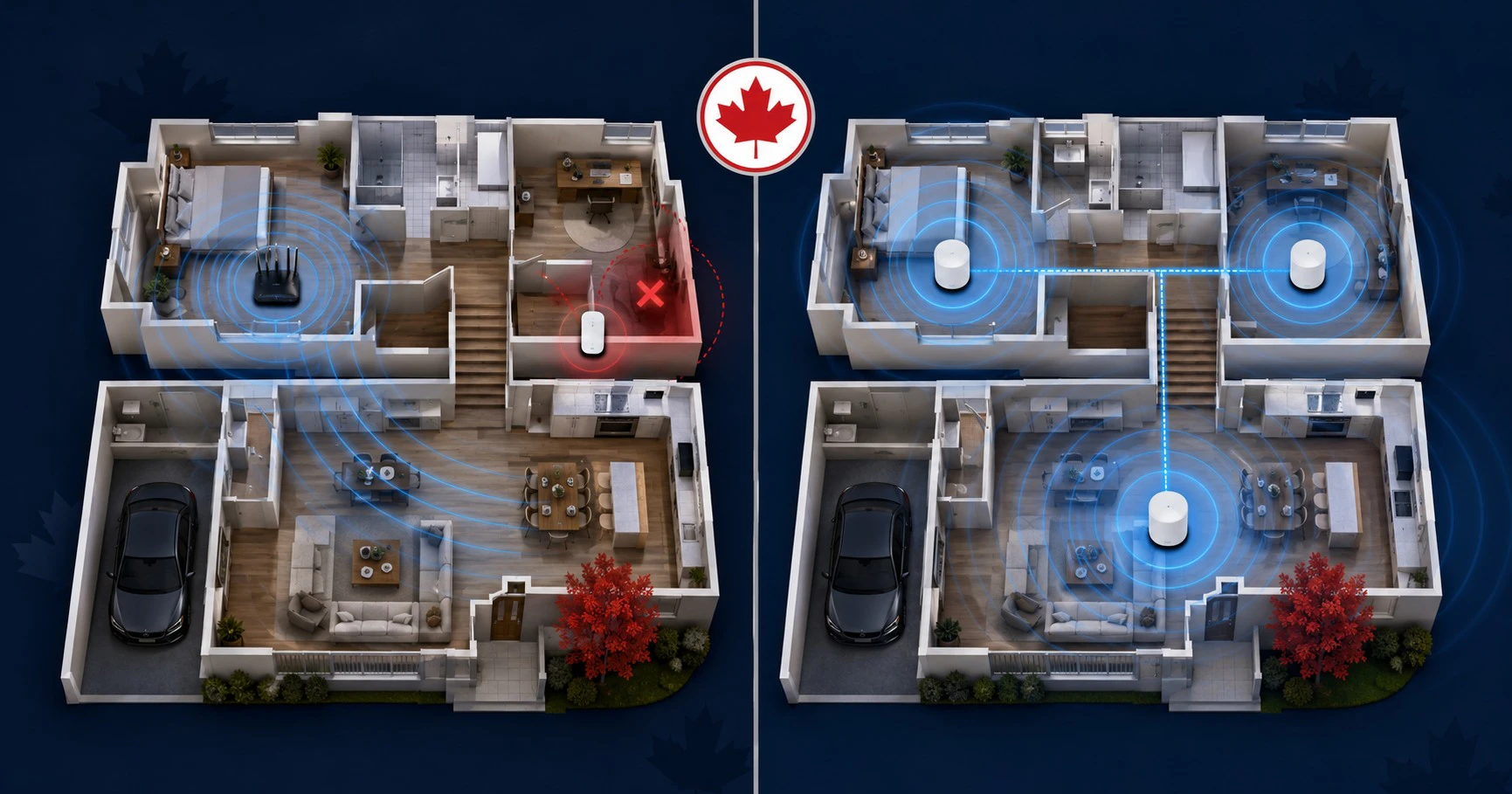
A Wi-Fi extender is the cheaper answer to one dead zone. Mesh is usually the better answer when weak coverage follows you through half the house.
Neither product can repair slow Internet arriving from the provider, and neither should be purchased before testing the router’s placement. Home networking has an unfortunate habit of turning a misplaced box into a three-box shopping trip.
Start by identifying whether the problem is Internet speed, Wi-Fi coverage or the device itself.
Run three tests before buying hardware
Stand near the existing router and run a speed test on a modern phone or laptop. Then repeat the test in the problem room and, where possible, connect a computer directly to the router with Ethernet.
| Result | Likely problem |
|---|---|
| Wired and nearby Wi-Fi are both slow | Internet plan, modem, router or provider issue |
| Nearby Wi-Fi is fast but one room is slow | Local coverage problem |
| Several distant rooms are slow | Whole-home coverage or building-material problem |
| Only one device is slow | Device hardware, software or Wi-Fi compatibility |
Move the router into an open, central and elevated position before adding equipment. A router hidden beside the electrical panel or behind a television begins every connection at a disadvantage.
Choose an extender for one contained problem
A range extender receives the existing Wi-Fi signal and retransmits it. It can be a reasonable fix for a bedroom, garage or corner where basic browsing and streaming need more reliable coverage.
Placement determines whether it helps. The extender must receive a usable signal from the router before it can pass that signal onward.
TP-Link recommends positioning an extender roughly halfway between the router and the dead zone, while keeping it within the router’s reliable range. Placing it inside the dead zone simply gives the household a stronger connection to a weak source.
An extender makes sense when:
- Only one small area has poor coverage.
- Internet use there is relatively light.
- The existing router is current and otherwise adequate.
- A low-cost fix matters more than seamless roaming.
- Running Ethernet is not practical.
The extra wireless hop can reduce speed
Wireless traffic connected through an extender may travel from the device to the extender and then from the extender to the router. That additional hop consumes time and radio capacity.
TP-Link acknowledges that extender-connected devices may receive lower speeds than devices connected directly to the router. The actual difference depends on distance, interference, bands, hardware and network traffic.
Dual-band and tri-band products can manage that relay more effectively, but the extender still needs a healthy connection upstream. Marketing range cannot repeal walls, metal ductwork or crowded neighbouring networks.
Choose mesh for broad or complicated coverage
A mesh system uses a primary router and coordinated nodes that share network management. The system can steer devices between nodes and bands while presenting one main network name.
Mesh generally suits:
- Larger or multi-storey homes
- Several dead zones
- Devices that move around the home
- Households with many active connections
- Users who want one application managing the network
The advantage is coordination, not magic. Each mesh node still needs a strong path back to the main router. That path is called backhaul.
Backhaul determines how well mesh performs
Wireless mesh nodes use part of their radio capacity to communicate with one another. Dual-band systems may share the same bands between devices and backhaul, while some tri-band systems reserve a separate band for node communication.
Ethernet backhaul connects the nodes by cable. This normally preserves more wireless capacity for phones, computers and televisions while improving stability.
ASUS documents how Ethernet backhaul releases additional wireless bandwidth for client devices. Other mesh systems offer similar wired options, but ports and supported network layouts vary.
If Ethernet already reaches the problem room, a wired access point may be more efficient than either an ordinary extender or a completely new mesh kit.
Do not create two routers accidentally
Canadian Internet providers commonly supply a gateway combining the modem and router. Connecting another full router behind it can create double network address translation, often called double NAT.
Ordinary browsing may still work, but gaming, remote access, port forwarding and some smart-home devices can become more difficult.
Before installing mesh, check whether the ISP gateway supports bridge mode or whether the mesh system can operate in access-point mode. Ask the provider before changing gateway settings required for telephone or television service.
Compatibility claims need careful reading
Words such as “mesh compatible” do not mean every router and node can join one coordinated system.
Even products from the same manufacturer can use different mesh families. TP-Link’s current documentation describes compatibility limits between EasyMesh, OneMesh and Deco.
Check the exact model, hardware revision and firmware version. Buying a matching logo without checking the compatibility list can leave the home with an expensive ordinary extender.
Use this decision guide
Buy an extender when:
One room has weak Wi-Fi, the rest of the network works well, and the room does not need the highest possible speed.
Buy mesh when:
Coverage fails across several rooms or floors, devices move around frequently and coordinated management is worth the additional cost.
Install a wired access point when:
Ethernet reaches the weak area and performance or stability matters more than avoiding a cable.
Call the provider first when:
Wired tests are also slow, the gateway frequently disconnects or the subscribed Internet speed never reaches the home.
Placement still matters after purchase
Do not place every node at the outer edge of the signal. Begin with each node somewhere between the previous node and the intended coverage area, then measure performance.
Avoid enclosing nodes inside cabinets or placing them beside large metal objects, microwaves and dense utility spaces. Fewer well-positioned nodes can outperform several poorly positioned ones that create unnecessary interference.
Mapletechie’s home Wi-Fi security guide explains the settings to review after installation. New networking hardware still needs current firmware, a unique administrator password and modern WPA2 or WPA3 encryption.
Buy the smallest fix that solves the measured problem
An extender is not inherently bad, and mesh is not automatically better. They address different scales of failure.
Measure the connection beside the router and inside the weak rooms. If one small gap remains, an extender may be enough. If weak coverage defines the entire floor plan, coordinated mesh—or properly installed wired access points—will usually justify the additional cost.
Tags: Wi-Fi, mesh networks, range extenders, home networking, routers